Processed Image Comparator
For processed image data, you can select metrics such as Mean Squared Error (MSE), Normalized Root Mean Square Error (NRMSE), Peak Signal-to-Noise Ratio (PSNR), and Structural Similarity Index (SSIM), to evaluate the quality of images generated by denoising deep learning models or that were processed by filtering or any other operation.
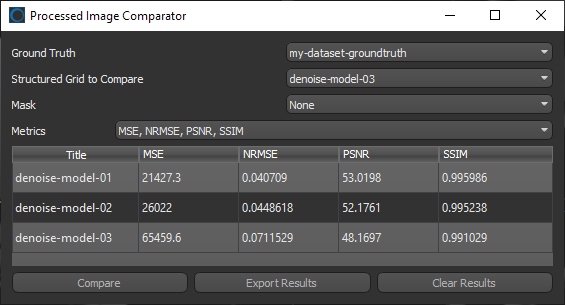
To open the Processed Image Comparator, shown below, select the ground truth and processed image data in the Data Properties and Settings panel, right-click, and then choose Open Processed Image Comparator in the pop-up menu. You can then select a mask and the required metrics to evaluate your data.
You should note that results are cumulative and can be exported in the comma-separated values (*.csv extension) file format for further analysis or archiving.
Processed Image Comparator dialog
 How to Evaluate Processed Images
-
Do one of the following:
-
Select the ground truth and processed image data in the Data Properties and Settings panel, right-click, and then choose Open Processed Image Comparator in the pop-up menu
-
Choose Utilities >Structured Grids Comparator on the menu bar to open the Structured Grids Comparator dialog.
You can then choose a ground truth and the processed data you to evaluate in the drop-down menus.
-
-
Select an ROI mask, optional.
-
Select the required metric(s) in the Metrics drop-down menu.
-
Click Compare.
-
Select another dataset to compare, optional.